Vibrant Circular Arrow Icons for Creative Projects
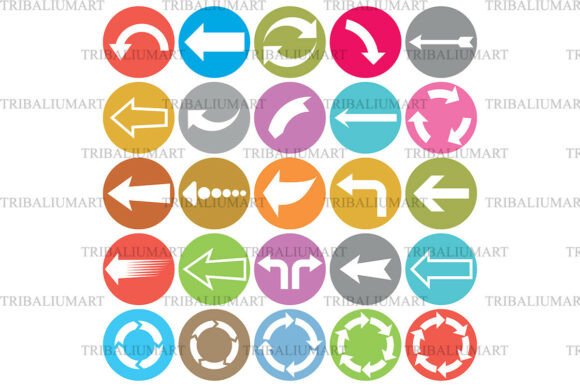
Visual communication plays a crucial role in conveying ideas, guiding users, and enhancing the overall appeal of digital and print materials. The Vibrant Circular Arrow Icons collection offers a versatile set of 25 colorful icons designed to meet the needs of professionals and creators across industries. Featuring bold white arrows in multiple directions and styles, these icons are more than just decorative elements—they serve as practical tools for improving clarity, navigation, and visual storytelling.
Each icon is presented on a bright, solid-colored background, ensuring high visibility and compatibility with a wide range of design aesthetics. Whether you're working on a website, a mobile app, an infographic, or a presentation, these icons can help streamline your design process and elevate the user experience.
Why Icon Design Matters in Modern Projects
In today's fast-paced digital environment, users expect intuitive navigation and clear visual cues. Icons act as universal symbols that transcend language barriers and simplify complex concepts. The Vibrant Circular Arrow Icons provide a consistent visual language that helps guide attention, indicate direction, and support interactive elements without overwhelming the viewer.
For web designers and UI/UX professionals, choosing the right icons can mean the difference between a cluttered interface and a clean, user-friendly layout. These icons are especially effective when used in navigation menus, call-to-action buttons, and instructional graphics, where clarity and direction are essential.
Multiple Styles for Diverse Use Cases
The collection includes a variety of arrow types—straight, curved, looping, rotating, and motion-based—each serving a unique purpose. A curved arrow might suggest progression or a return to a previous step, while a rotating arrow could imply refresh or continuous movement. Motion arrows are ideal for indicating transitions or dynamic changes in an interface or visual presentation.
These design variations allow creators to match the tone and intent of their project more precisely. For example, educators designing digital planners or course materials can use looping arrows to represent recurring tasks or processes. Meanwhile, marketers crafting social media infographics can use bold, directional arrows to highlight trends or key data points.
Flexible Formats for Seamless Integration
One of the standout features of the Vibrant Circular Arrow Icons is the variety of file formats included: SVG, EPS, JPEG, PNG, and PDF. This ensures compatibility with different design tools and platforms, from Adobe Illustrator to Canva and Figma. With all 25 icons included in each format within a single ZIP file, users can access the entire collection without managing dozens of individual files.
SVG files, for instance, offer the advantage of scalability without loss of quality, making them perfect for responsive web design. PNG files provide transparency options, which are useful for overlaying icons on various backgrounds. JPEG and PDF formats are ideal for print materials or presentations where high resolution is required.
Who Benefits Most from This Icon Set?
This collection is particularly valuable for professionals who frequently work with visual content. Web designers can incorporate these icons into landing pages or dashboards to improve user interaction. UI/UX developers may use them to enhance mobile app navigation or tutorial flows. Educators and content creators can integrate them into lesson plans, digital planners, or infographics to guide learners through structured processes.
Entrepreneurs and small business owners also benefit from using these icons in marketing materials, reports, and presentations. By incorporating visually consistent and meaningful symbols, they can communicate complex ideas more efficiently and maintain a professional appearance across all branding materials.
How to Maximize the Value of Vibrant Circular Arrow Icons
To get the most out of this icon set, consider the following practical applications:
- Navigation elements: Use directional arrows to guide users through a website or app interface.
- Infographics: Highlight data flow or process steps with clear, colorful icons that draw attention without causing visual clutter.
- Presentation slides: Illustrate transitions, cycles, or directional movement in business or educational presentations.
- Social media graphics: Enhance visual storytelling with icons that direct the viewer’s focus or indicate trends.
- Digital planners: Represent actions like returning to a previous page, refreshing content, or repeating tasks.
By aligning each icon's style with its intended function, you can create more intuitive and visually appealing designs. The bold white arrows on vibrant backgrounds ensure visibility and adaptability, whether used on a dark or light theme, or against complex or minimalist layouts.
Considerations for Choosing the Right Icon Set
While the Vibrant Circular Arrow Icons offer a wide range of benefits, it's important to assess whether this set aligns with your specific project needs. If your design requires highly detailed or niche icons, you may need to supplement this collection with additional graphics. However, for most general use cases—especially those requiring directional cues and motion indicators—this set provides a comprehensive and cohesive solution.
Before purchasing, ensure you have the appropriate software to open and edit SVG, EPS, JPEG, PNG, and PDF files. While PNG and JPEG files can be used in most basic image editors, SVG and EPS files may require vector-based tools like Adobe Illustrator or Inkscape for full customization.
Final Thoughts on Visual Clarity and Efficiency
Icons are more than just visual embellishments—they are essential tools that enhance communication, guide user behavior, and simplify complex information. The Vibrant Circular Arrow Icons deliver a balanced combination of style and functionality, making them a valuable asset for anyone involved in digital or print design.
Whether you're building a website, designing a mobile app, creating educational content, or preparing a presentation, these icons can help you convey direction, motion, and action more effectively. Their versatility, combined with the convenience of multiple file formats, makes this collection a practical choice for professionals seeking to streamline their design workflow and improve visual communication.